Parallax Website Examples: 12 Sites Scrolled, Measured and Taken Apart
Quick answer. Good parallax website examples in 2026 include Sonos, Apple’s AirPods Pro page, Spyker, Firewatch and the Canadiens Children’s Foundation. We scrolled twelve in Chrome on 13 November 2026. Eleven move 2 to 17 layers at their own speed, three show none at phone size, and one stopped every layer when we asked for reduced motion.
Which one are you? The list is the same. The next step is not.
- Building this for your own product. Skip to what it costs, then send us the product and the deadline on WhatsApp. You get a fixed number back within 24 hours, not a range. Prefer email? Get your price here.
- Agency or freelancer with a client who wants a parallax site. We build it white-label, from $3,000 for a full build, fixed price and fixed date. You set the client price and keep the difference. Your name goes on it, not ours. Pitching something like this to a client? The rate card has the list price per tier, and the phone test clause is wording you can paste into your own proposal. How the margin works. Send the brief and the number comes back within 24 hours.
- Collecting references. Good. Bookmark it. The side-by-side table and the six ways to build parallax are the parts worth saving.
Most lists of parallax websites are a wall of screenshots and the word “immersive”. A screenshot cannot show parallax. The whole effect is things moving at different speeds while you scroll, so a still picture is the one format that hides it.
So we scrolled them. On 13 November 2026 we opened 67 sites from the usual parallax roundups, award galleries and library showcases, and watched what each element did when the page moved. 33 had at least one layer that really travels at its own speed. We took twelve apart: how the effect is built, how many layers move and how fast, page weight before and after scrolling, and what is left at phone size and with reduced motion switched on. Every number below comes from those captures.
Free, and from a human
What would a parallax site for your brand cost?
Send me your site or your product page. I read it myself and reply within 24 hours with a fixed price, what I'd build first, and whether it's worth doing at all. If a scroll story won't move your numbers, I'll say so and you keep the plan.
Got it. A confirmation is on its way to your inbox, and your price follows within 24 hours, from me. Rather talk it through? Book 15 minutes →
No call needed. Builds start at $3,000 and usually take 2 to 4 weeks. Streets of Punk and Nugget Nation are two of ours.
The 12 parallax websites at a glance
| Site | Category | How the parallax is made | Layers found | Slowest to fastest | At load (+8 s) | After scrolling | Phone size | Reduced motion |
|---|---|---|---|---|---|---|---|---|
| Sonos | Audio brand | Inline transforms written by script. The bundle ships Motion (Framer Motion) scroll hooks; no GSAP or Lenis | 8 | 0.95x to 1.05x | 10.9 MB | 20.6 MB over 14.7 screens | 3 layers, 6.0 MB | Still moves |
| Apple AirPods Pro | Product page | Apple’s own script writing inline transforms, no parallax library found | 2 | 1.07x | 8.8 MB | 20.8 MB over 32.5 screens | 2 moving elements, 7.6 MB | Parallax image stops, a scaling tile still moves |
| Spyker | Car maker | GSAP ScrollTrigger scrubbed to the scroll bar, with Lenis smooth scroll | 17 | 0.81x to 1.26x | 8.8 MB | 13.5 MB over 10.6 screens | 11 layers, 8.9 MB | Switched off |
| Firewatch | Video game | A small jQuery script reading a data-speed value on each layer | 8 | 0.02x to 0.69x | 19.0 MB | 19.0 MB over 4.3 screens | None found, 18.7 MB | Still moves |
| Canadiens Children's Foundation | Charity | GSAP ScrollTrigger scrubbed to the scroll bar, with Lenis smooth scroll | 12 | 0.90x to 0.97x | 1.5 MB | 2.2 MB over 11.9 screens | 7 layers, 1.2 MB | Still moves |
| Wokine | Digital agency | GSAP ScrollTrigger scrubbed to the scroll bar, with Lenis smooth scroll | 13 | 0.95x to 1.18x | 10.3 MB | 11.9 MB over 13.9 screens | None found, 10.3 MB | Still moves |
| Jomor Design | Designer portfolio | Webflow interactions writing inline transforms | 11 | 1.22x to 1.47x | 5.5 MB | 5.5 MB over 11.5 screens | 9 layers, 5.5 MB | Still moves |
| The Goonies | Film tribute | Webflow interactions writing inline transforms | 4 | 1.08x to 1.38x | 12.5 MB | 12.5 MB over 8.6 screens | 2 layers, 12.6 MB | Still moves |
| NASA Prospect | Interactive story | Stellar.js, a jQuery parallax plugin, with a data-stellar-ratio on each layer | 11 | 1.25x to 2.10x | 1.0 MB | 6.3 MB by the end of the story | Could not scroll it, 0.9 MB | 8 found, still moves |
| Cyclemon | Illustration project | CSS background-attachment: fixed, plus a jQuery script shifting background-position | 36 fixed backgrounds | Background stays put | 2.9 MB | 2.9 MB over 23.6 screens | None found, 2.3 MB | Backgrounds stay fixed |
| Locomotive Scroll | Scroll library | Locomotive Scroll 5, a data-scroll-speed value on each element, built on Lenis | 16 | 1.03x to 1.43x | 0.3 MB | 0.3 MB over 17.7 screens | 5 layers, 0.3 MB | 10 speed layers stop, 6 CSS ones still move |
| Scroll-driven Animations | CSS demo site | CSS scroll-driven animations (animation-timeline), no script for the motion | 13 | 0.37x | 0.9 MB | 2.7 MB over 11.1 screens | 8 layers, 0.9 MB | Still moves |
Weigh your own site against these. The Site Weight Check ranks your megabytes among the 110 sites we weighed across our guides. When Google's meter answers you get your number on the spot; when it does not, you type it yourself in 30 seconds. No score, no email for the result.
12 parallax scrolling websites, taken apart
Ordered from brands you know to the tools that build the effect. Every number comes from the live page in desktop Chrome at 1440 by 900. We record what has loaded eight seconds after the page finishes loading, wheel-scroll to the bottom in 450-pixel steps and record the total again. Then we stop at 5 to 12 depths down the page, scroll 240 pixels down and 240 back up, and compare where every visible element went.
A layer, in this guide, is an element that moved at a different speed from the page, stayed still when we were not scrolling, and returned to where it started when we scrolled back. That rules out fade-ins, sliders and sticky headers. Speeds are relative to the page: 1.00x keeps pace with the scroll, 0.50x drifts at half speed like a distant background, anything above 1.00x races ahead like a foreground. Because we only stop at a few depths, layer counts are a floor, not a census. The speed range covers layers that only slide. Ones that also scale or rotate, ones smaller than about 140 by 140 pixels, and ones whose mechanism we could not identify are counted but left out of the range. On Sonos we removed two elements by hand: a locale banner on desktop and a pop-up iframe at phone size. The phone pass repeats the test at 390 by 844 with an iPhone browser identity and touch scrolling, with a scripted scroll where the touch gesture did not move the page. The reduced-motion pass repeats the desktop test with prefers-reduced-motion: reduce switched on. No cookies accepted anywhere.
An agency would typically quote $20,000 to $60,000 and up for a brand site with motion like the bigger builds here. Parallax itself is the cheap part. The art that moves is not.
1. Sonos, audio brand

Made with: Inline transforms written by script. The bundle ships Motion (Framer Motion) scroll hooks; no GSAP or Lenis · 8 layers moving at their own speed in our probes, at 0.95x to 1.05x the speed of the page · 10.9 MB at load, 20.6 MB over a full scroll of 14.7 screens · Built on Next.js · Phone size: 3 layers still moved, 6.0 MB · Reduced motion: still moves
The biggest brand here uses parallax the way most big brands do now: once, quietly. Most of the Sonos homepage scrolls like any shop. Then, about three quarters of the way down, a row of tall image strips slides past each other. In our probe the strips alternated between 0.95x and 1.05x the speed of the page, so neighbours drift apart by a few pixels as you scroll.
That is 8 layers on a page of 14.7 screens. We found no GSAP and no Lenis. The Next.js bundle includes Motion’s scroll hooks, and the strips get inline transform values rewritten as the page moves. The weight has nothing to do with the effect: 10.9 MB at load, 4.7 MB of it images and 3.4 MB JavaScript, and 20.6 MB by the bottom. Phones got a lighter 6.0 MB and kept 3 of the strips moving.
Steal this: One parallax moment on a long page gets noticed. Ten get ignored. Pick the section that deserves it and leave the rest alone.
2. Apple AirPods Pro, product page

Made with: Apple’s own script writing inline transforms, no parallax library found · 2 layers moving at their own speed in our probes, at 1.07x the speed of the page · 8.8 MB at load, 20.8 MB over a full scroll of 32.5 screens · No framework or site builder detected · Phone size: 2 elements still moved, 7.6 MB · Reduced motion: parallax image stops, a scaling tile still moves
Apple is the reason plenty of briefs say “make it scroll like Apple”. So it is worth knowing how little classic parallax this page uses. Across 32.5 screens we caught 2 layers. One is a large image in a container Apple’s own code calls parallax-image, which ran at 1.07x. The other is a product tile that eases and scales at 0.98x. With reduced motion on, the parallax image stops and only the tile still moves.
The drama on this page comes from somewhere else: video that plays as you arrive and sections that hold still while the content changes. That is why it weighs 8.8 MB on load, 6.1 MB of it one hero video, and 20.8 MB after a full scroll. If the Apple look is what you are after, parallax is a small part of it. Our websites like Apple list covers the rest.
Steal this: A 7 percent speed difference on one big image is enough.
3. Spyker, car maker

Made with: GSAP ScrollTrigger scrubbed to the scroll bar, with Lenis smooth scroll · 17 layers moving at their own speed in our probes, at 0.81x to 1.26x the speed of the page · 8.8 MB at load, 13.5 MB over a full scroll of 10.6 screens · Built on Next.js · Phone size: 11 layers still moved, 8.9 MB · Reduced motion: switched off
The highest layer count of the twelve. The Dutch sports-car maker’s homepage moved 17 layers in our probes, from 0.81x to 1.26x: full-width photographs that lag behind the scroll, smaller heritage pictures that run ahead of it. It is built on Next.js with GSAP 3.15.0, and 18 of its ScrollTriggers are scrubbed, meaning tied directly to the scroll position.
Then we switched on reduced motion and every one of those layers stopped. Zero moved. Spyker was the only one of the twelve where nothing we tracked kept moving, and that costs a developer a few lines. Phones keep the effect: 11 layers still moved at phone size. The weight is video, 6.5 of 8.8 MB at load, 13.5 MB by the bottom.
Steal this: Wrap the parallax in a reduced-motion check. Visitors who get dizzy from motion have already told their device. Spyker listens.
4. Firewatch, video game
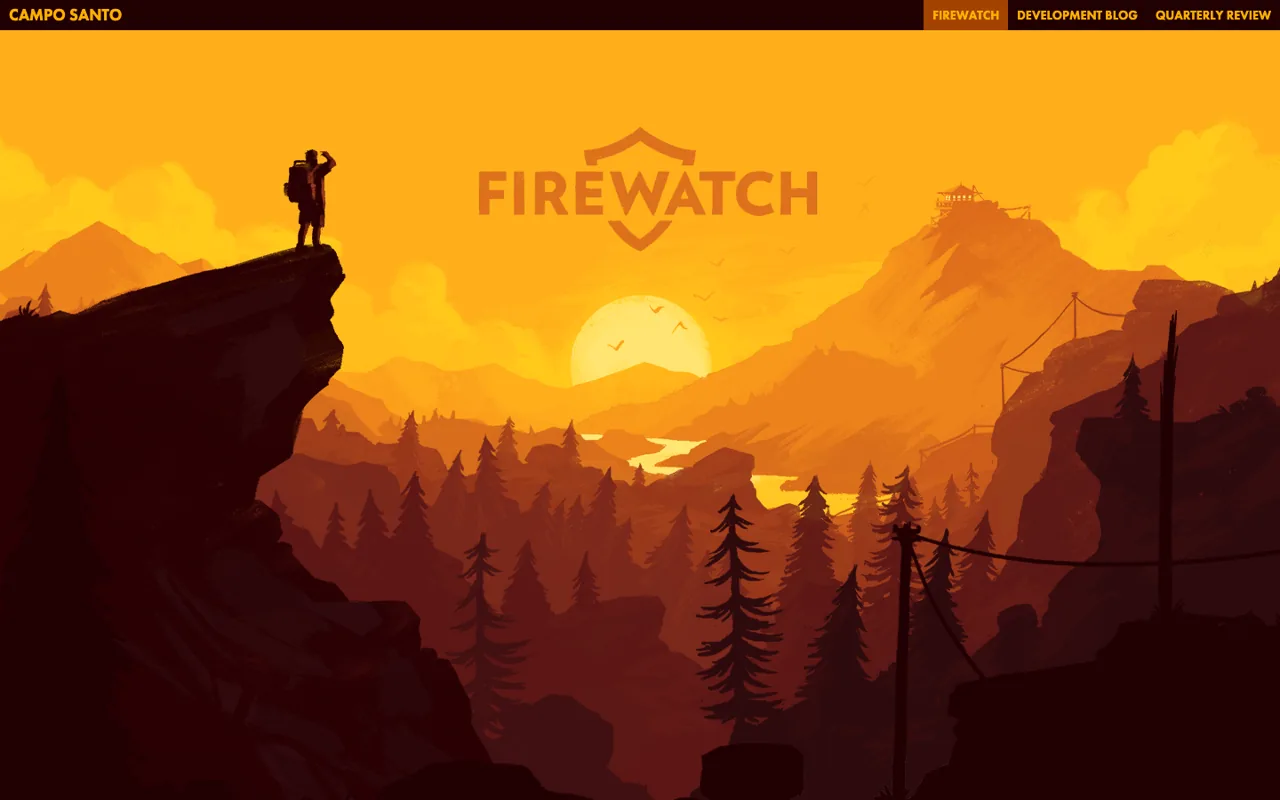
Made with: A small jQuery script reading a data-speed value on each layer · 8 layers moving at their own speed in our probes, at 0.02x to 0.69x the speed of the page · 19.0 MB at load, 19.0 MB over a full scroll of 4.3 screens · No framework or site builder detected · Phone size: no parallax found, 18.7 MB · Reduced motion: still moves
The hero is a sunset cut into flat layers: sky, far mountains, near hills, trees, the hiker on the cliff. We found 8 of them, each a full-screen image with its own data-speed, moving at 0.02x up to 0.69x. The furthest layer barely moves and the nearest trees travel at about two thirds of the page speed, which is how depth works out of a train window.
It is old-school: jQuery, a short script and inline transforms. The art for all those layers is light, 1.5 MB of images. Yet the page weighed 19.0 MB when we loaded it, because 17.4 MB of that is fonts, nearly all of it one 17 MB Japanese font file, loaded for a single line of footer text. At phone size we found no parallax at all, and the page still sent 18.7 MB.
Steal this: Depth comes from many layers with small speed differences. Eight flat images at eight speeds beats one big image at half speed.
5. Canadiens Children's Foundation, charity

Made with: GSAP ScrollTrigger scrubbed to the scroll bar, with Lenis smooth scroll · 12 layers moving at their own speed in our probes, at 0.90x to 0.97x the speed of the page · 1.5 MB at load, 2.2 MB over a full scroll of 11.9 screens · Built on SvelteKit · Phone size: 7 layers still moved, 1.2 MB · Reduced motion: still moves
Proof that parallax does not have to be heavy. The Montreal Canadiens Children’s Foundation moved 12 layers in our probes on a first load of 1.5 MB, and 2.2 MB after 11.9 screens. Nearly every photograph sits in a frame and slides inside it at 0.90x to 0.97x as you pass, the classic window effect.
It runs on SvelteKit with GSAP 3.13.0 and Lenis, with 12 scrubbed ScrollTriggers. On 9 of the 12 layers the transform arrives through the stylesheet, not as an inline style, which is the pattern you get when the script feeds scroll progress to CSS and lets CSS do the moving. Phones keep it, 7 layers on 1.2 MB. Reduced motion changed nothing.
Steal this: Move the photo inside its frame, not the frame itself. The layout stays put, nothing overlaps, and it works at any screen size.
6. Wokine, digital agency

Made with: GSAP ScrollTrigger scrubbed to the scroll bar, with Lenis smooth scroll · 13 layers moving at their own speed in our probes, at 0.95x to 1.18x the speed of the page · 10.3 MB at load, 11.9 MB over a full scroll of 13.9 screens · Built on Nuxt · Phone size: no parallax found, 10.3 MB · Reduced motion: still moves
A French digital agency from Lille, with 13 layers in our probes. Project images carry a data-prllx attribute and run at 1.07x to 1.18x, while rows of oversized text slide past at 0.95x and 1.05x, one row lagging and the next leading. A few layers scale as they travel.
The stack is Nuxt with GSAP 3.15.0, 10 scrubbed ScrollTriggers, Lenis, and a 3D scene running on Three.js r149. Thirteen elements passed our test. Seven are clean sliding layers; the rest are buttons, an icon and a showreel that scale or follow the scroll. Wokine makes the opposite phone decision to Spyker. At phone size we found no parallax layers, though the page still sent 10.3 MB. On a small screen with a thumb doing the scrolling, that is a defensible call.
Steal this: Decide what phones get on purpose. Parallax tuned for a 1440 pixel screen rarely survives at 390, so cut it there or rebuild it there.
Have a product, or just a question about this? You don't have to book a call. Message us. Ishan replies within 24 hours.
7. Jomor Design, designer portfolio

Made with: Webflow interactions writing inline transforms · 11 layers moving at their own speed in our probes, at 1.22x to 1.47x the speed of the page · 5.5 MB at load, 5.5 MB over a full scroll of 11.5 screens · Built on Webflow · Phone size: 9 layers still moved, 5.5 MB · Reduced motion: still moves
A designer’s portfolio on Webflow, with no GSAP and no extra library. Everything here is Webflow’s built-in interactions, 46 elements wired to them, and it still moved 11 layers in our probes. Full-width project frames run at 1.09x while their titles run at 1.22x, so each title overtakes its picture as you scroll. The frames also scale, which keeps them out of the speed range above.
The weight is modest for a portfolio: 5.5 MB, 2.9 MB of it images and 1.9 MB one showreel, and nothing more is added by scrolling. Phones keep the effect, 9 layers at phone size. If you are a freelancer wondering whether you need to learn GSAP to sell parallax, this page says no.
Steal this: Give the title and the image two different speeds. The gap between them opening and closing is the whole effect, and Webflow can do it without code.
8. The Goonies, film tribute

Made with: Webflow interactions writing inline transforms · 4 layers moving at their own speed in our probes, at 1.08x to 1.38x the speed of the page · 12.5 MB at load, 12.5 MB over a full scroll of 8.6 screens · Built on Webflow · Phone size: 2 layers still moved, 12.6 MB · Reduced motion: still moves
A tribute to the 1985 film, built in Webflow, and a regular on parallax lists. The opening pulls back through a frame of branches to the coast. Further down, cast photos, coins and a key drift at their own speeds. We caught 4 layers on the standard pass, up to 1.38x, and 8 on the reduced-motion pass at the same stops. The count moves from run to run, because props drift in and out of view.
So the setting changes nothing here. The cost is pictures and clips: 12.5 MB on load, 7.4 MB of images and 4.5 MB of video, and phones get the same 12.6 MB with 2 layers still moving.
Steal this: Small props at mixed speeds, a coin here and a key there, make a page feel deep without touching the main content.
9. NASA Prospect, interactive story
Made with: Stellar.js, a jQuery parallax plugin, with a data-stellar-ratio on each layer · 11 layers moving at their own speed in our probes, at 1.25x to 2.10x the speed of the page · 1.0 MB at load, 6.3 MB by the end of the story, which scrolls inside one fixed screen · No framework or site builder detected · Phone size: our script could not scroll it, 0.9 MB · Reduced motion: 8 found, still moves
A space story you scroll through, with music, and a piece of web history. It runs on Stellar.js, a jQuery plugin from the early 2010s, and 86 elements carry a data-stellar-ratio. Each scene is three stacked full-screen layers named background, middleground and foreground. We measured them at 1.25x, 1.6x and 2.1x, and found 11 layers in all.
The first load is tiny at 1.0 MB. It reaches 6.3 MB by the end because 5.4 MB of audio streams in as the story plays. The page does its own scrolling inside a fixed window. At phone size our script could not drive that scroller, so the phone result is a blank, not a zero. It is here because the method still works more than a decade on, and because it shows the limit of that era: built for one screen size.
Steal this: Name your layers background, middleground and foreground and give each one speed. Three is enough for the eye to read depth.
10. Cyclemon, illustration project

Made with: CSS background-attachment: fixed, plus a jQuery script shifting background-position · 36 backgrounds with background-attachment: fixed, 19 background positions moved by script in our probes · 2.9 MB at load, 2.9 MB over a full scroll of 23.6 screens · No framework or site builder detected · Phone size: no parallax found, 2.3 MB · Reduced motion: backgrounds stay fixed
A series of illustrated bicycles, one per screen, and the oldest trick in the book. Each panel’s background is pinned to the window with background-attachment: fixed, so the colour stays put while the bike scrolls over it. We counted 36 of those backgrounds, and saw a script nudge 19 background positions as we scrolled. No element moves at its own speed, which is why the layer count reads zero.
It is cheap: 2.9 MB for 23.6 screens, almost all of it images. And it shows why this method fell out of favour. At phone size we found none of the 36 fixed backgrounds. At phone size the site showed plain scrolling panels. Fixed backgrounds have long been unreliable on phone browsers, so most sites that use them switch them off there.
Steal this: A fixed background is one line of CSS and needs no script. Use it for a simple desktop reveal and plan a plain version for phones.
11. Locomotive Scroll, scroll library

Made with: Locomotive Scroll 5, a data-scroll-speed value on each element, built on Lenis · 16 layers moving at their own speed in our probes, at 1.03x to 1.43x the speed of the page · 0.3 MB at load, 0.3 MB over a full scroll of 17.7 screens · No framework or site builder detected · Phone size: 5 layers still moved, 0.3 MB · Reduced motion: 10 speed layers stop, 6 CSS ones still move
A library that many award-site builds have leaned on, showing itself off. You add data-scroll-speed to an element and it moves. The homepage has 11 elements tagged that way, and we measured 16 layers between 1.03x and 1.43x. Version 5 sits on top of Lenis, the smooth-scroll library.
This is the lightest page of the twelve by a distance: 0.3 MB, scripts included, for 17.7 screens. With reduced motion on, the 10 script-driven layers stopped and 6 lighter CSS-driven ones kept going, so the library backs off without going flat. Phones kept 5 layers. Of the sixteen elements that passed our test, ten are the speed-tagged shapes, four are small spans and two are scaling SVGs.
Steal this: If you want speed-per-element parallax without writing scroll maths, this is the shortest route, and it weighs almost nothing.
12. Scroll-driven Animations, CSS demo site
Made with: CSS scroll-driven animations (animation-timeline), no script for the motion · 13 layers moving at their own speed in our probes, at 0.37x the speed of the page · 0.9 MB at load, 2.7 MB over a full scroll of 11.1 screens · No framework or site builder detected · Phone size: 8 layers still moved, 0.9 MB · Reduced motion: still moves
The newest method here. This is the reference demo site for CSS scroll-driven animations, where the browser itself ties an animation to the scroll position through animation-timeline. No JavaScript moves anything. We found 20 scroll-driven animations running on the homepage and 13 layers moved by them, the demo cards sliding into place at 0.37x the page speed as they enter.
It weighs 0.9 MB on load and 2.7 MB after 11.1 screens, most of that preview clips. Of the 62 candidate sites that loaded, this was the only one running the feature on the page we tested. It is not on any brand site in this list yet. Phones kept 8 layers. Reduced motion changed nothing, though with CSS that is one media query away.
Steal this: For a simple parallax drift or a reveal tied to scroll, try CSS first. No library to load, and the browser can run it off the main thread.
What 67 candidate sites told us
Before choosing the twelve we screened 67 candidates: the sites that parallax roundups keep repeating, award-gallery picks, and the demo pages of the libraries people use. 62 loaded. Here is how they split.
- About half really do parallax. 33 of the 62 moved at least one layer at its own speed by our test. Two more, Cyclemon and Bagigia, pin backgrounds in place instead.
- 14 gave our script a page that would not scroll. Canvas builds, custom scroll containers, intro screens, and probably a consent wall or two. Several are well-known award sites, and one old favourite now just says Coming Soon. We could not measure them and left them out.
- 15 scrolled but showed no moving layer, Cyclemon and Bagigia included. Some “parallax” sites on popular lists are now ordinary pages, or do fades and pinned sections that look similar in a screenshot. Our test is strict, so a few real effects inside pinned sections will have been missed too.
- Old lists rot. 5 well-known examples failed to load or refused our browser.
- GSAP and Lenis are the common pair on new builds. 10 of the 33 sites with layers run GSAP, 7 of them with ScrollTriggers scrubbed to the scroll bar, and 11 run Lenis. Our best GSAP websites list takes that engine apart.
- Few sites switch parallax off for reduced motion. In our run 3 of the 33 stopped every layer: Spyker, and the demo pages of the Jarallax and simpleParallax libraries.
Six ways to build parallax, and who uses which
| Method | How it works | In our twelve | Trade-off |
|---|---|---|---|
| JavaScript writing transforms | A script reads the scroll position and rewrites each layer’s transform | Sonos, Apple, Firewatch | Full control, but you write and maintain the maths |
| GSAP ScrollTrigger, scrubbed | An animation is tied to the scroll bar, usually smoothed by Lenis | Spyker, Canadiens Children’s Foundation, Wokine | The standard for new brand builds. A library to load, but a small one |
| A speed attribute library | You tag elements with a speed and the library moves them | Locomotive Scroll (data-scroll-speed), NASA Prospect (Stellar.js) | Fastest to build. You get what the library offers |
| A site builder’s interactions | Scroll-linked movement set up in a visual editor | Jomor Design and The Goonies, both Webflow | No code. Harder to fine-tune per device |
| Fixed backgrounds | background-attachment: fixed pins a background while content scrolls over it | Cyclemon | One line of CSS. Unreliable on phones |
| CSS scroll-driven animations | animation-timeline ties a CSS animation to scroll, with no script | Scroll-driven Animations | Nothing to load. Per MDN it needs Chrome or Edge 115, Safari 26 or Firefox 159 |
There is a seventh way, drawing the scene in WebGL and moving a camera through it. Several of the sites that would not scroll for our script are built this way. Our cinematic website examples cover that kind of build.
Where the megabytes go (not parallax)
Moving a layer costs nothing to download. A transform is a number. On these twelve, loads ran from 0.3 MB to 19.0 MB, and on none of them was the effect the reason.
| Site | The biggest cost at load | Size |
|---|---|---|
| Firewatch | Fonts, nearly all one 17 MB Japanese font file | 17.4 of 19.0 MB |
| The Goonies | Images, then video clips | 7.4 and 4.5 of 12.5 MB |
| Sonos | Images, then JavaScript | 4.7 and 3.4 of 10.9 MB |
| Apple AirPods Pro | One hero video | 6.1 of 8.8 MB |
| Spyker | Video, streamed in 1080p chunks | 6.5 of 8.8 MB |
| Locomotive Scroll | Nothing. The whole page, library included | 0.3 MB |
5 of the twelve load under 3 MB: Locomotive Scroll, Scroll-driven Animations, NASA Prospect, the Canadiens Children’s Foundation and Cyclemon. Between them they use four different methods. The method does not decide the weight. The pictures and video you choose to move do.
Does parallax survive on a phone, and with reduced motion?
At phone size, 8 of the twelve kept it and 3 showed none. Firewatch, Wokine and Cyclemon had no parallax at 390 by 844. The twelfth, NASA Prospect, runs its own scroller that our phone test could not drive. For Wokine that is a design decision on a current site. For Firewatch and Cyclemon it is age: they were built for desktop screens. The catch is that dropping the effect did not make the page lighter. Firewatch still sent 18.7 MB and Wokine 10.3 MB. Only Sonos served phones a much smaller page, 6.0 MB against 10.9 MB.
A note on method: our phone pass is Chrome at phone size with an iPhone identity and touch scrolling. It shows what a site chooses to send a phone. It is not a test of Safari on a real iPhone.
With reduced motion on, one of the twelve stopped every layer we tracked, and two more stopped their parallax proper. Spyker went from 17 moving layers to none. Apple stopped its one parallax image and Locomotive Scroll stopped all 10 of its speed-tagged layers. On the other nine, the layers kept moving in our run. People who get motion sick from this kind of movement can ask their device for less of it, and the page can read that request with one media query, prefers-reduced-motion. It is the cheapest accessibility fix on a parallax site and the one most often skipped.
How to check how a site’s parallax is built
Two minutes in Chrome, no extensions:
- Right-click a layer that moves and choose Inspect.
- Scroll the page slowly while watching that element in the Elements panel. If its
styleattribute flickers with a changingtransform, a script is moving it. - Open the console and type
gsap.version. A version number means GSAP. ThenScrollTrigger.getAll().filter(t => t.vars.scrub).lengthcounts the scroll-tied animations, when the site exposes ScrollTrigger. - Type
document.querySelectorAll('[data-scroll-speed]').lengthfor Locomotive Scroll, or swap in[data-stellar-ratio]or[data-speed]for older libraries. - No inline style changing? Type
document.getAnimations().filter(a => a.timeline !== document.timeline).length. Anything above zero is a CSS scroll-driven animation. - To test reduced motion, open the Rendering panel (Cmd+Shift+P or Ctrl+Shift+P, type “rendering”), set “Emulate CSS media feature prefers-reduced-motion” to reduce, reload and scroll again.
One trap we fell into: a header that hides as you scroll down and returns as you scroll up looks exactly like a parallax layer to a script. So do sliders that move on their own. That is why our test checks that a layer stays still when the page is still.
Is parallax still worth using in 2026?
Yes, in small doses. The sites above that feel current use it on a handful of elements with small speed differences, often 5 to 25 percent off the page speed. The ones that feel dated make the whole page a diorama. Three rules cover most of it:
- Keep content in real HTML. The layers we measured are ordinary page elements, images and blocks of text, which search engines and screen readers can still read.
- Animate transforms only. Moving
transformis cheap for the browser. Movingtoporbackground-positionis not. - Respect the two settings. Decide what phones get, and switch off for reduced motion.
If the page needs to tell a story in order, parallax alone will not do it. That is scrollytelling, and the wider craft is in scroll animation website design.
What does a parallax website cost?
A range, not a quote. Adding a few parallax layers to a page that already exists is a small job. A brand site designed around layered motion, like Spyker’s or Wokine’s, is the kind of build agencies typically quote $20,000 to $60,000 and up for, and a portfolio or campaign page with builder interactions more like $8,000 to $20,000. The code for the movement is a small share of either. The money goes on art direction, photography or illustration cut into layers, video, and the pass that makes it behave on phones.
Hiring a developer instead of a studio? Read how to hire a scroll website developer.
DappaSol’s Flagship build starts at $3,000 and usually takes 2 to 4 weeks. Details on the 3D and cinematic service page, and the tier-by-tier breakdown in what a 3D or scroll website costs.
Designers and agencies: send a client our way and you get 10% of the build fee, paid when the client pays. Say "referral" in the first WhatsApp message and name the client. No form, no partner portal, no minimum.
Keep going
- Best GSAP websites: 12 sites measured live
- Scrollytelling website examples: stories told by scrolling
- Cinematic website examples: sites that feel like film
- Scroll animation website design: what works and what it costs
- Websites like Apple: 12 product sites that scroll like apple.com
- Horizontal scroll website examples, and when sideways works
- How to hire a 3D scroll website developer
- What a 3D or scroll website costs in 2026
- Our 3D and cinematic build service, with prices
FAQ
What is a parallax website?
A parallax website moves parts of the page at different speeds as you scroll, so backgrounds drift slowly and foreground elements move faster, which the eye reads as depth. In the twelve we measured, layers ran from 0.02 times the speed of the page on Firewatch’s furthest layer to 2.1 times on NASA Prospect’s foreground.
What are good parallax website examples?
Our twelve for November 2026: Sonos, Apple AirPods Pro, Spyker, Firewatch, the Canadiens Children’s Foundation, Wokine, Jomor Design, The Goonies, NASA Prospect, Cyclemon, Locomotive Scroll and Scroll-driven Animations. We scrolled each one in Chrome on 13 November 2026 and confirmed the effect by tracking how elements moved.
How is parallax scrolling made?
Six ways turned up in our test: a script writing transforms as you scroll (Sonos, Apple, Firewatch), GSAP ScrollTrigger tied to the scroll bar (Spyker, Wokine), a speed-attribute library such as Locomotive Scroll or Stellar.js, a site builder’s interactions (Webflow), fixed CSS backgrounds (Cyclemon), and CSS scroll-driven animations with no script at all.
Does parallax work on mobile?
It can, but many sites drop it. At phone size 8 of our twelve kept their parallax and 3 showed none: Firewatch, Wokine and Cyclemon. Spyker kept 11 moving layers at phone size. Fixed-background parallax is the least reliable on phones, and Cyclemon showed none of its 36 fixed backgrounds at phone size.
Is parallax bad for accessibility?
It can trigger dizziness or nausea in people sensitive to motion, which is why browsers expose a reduced-motion setting. In our run Spyker stopped every layer, and Apple and Locomotive Scroll stopped their main parallax layers. The other nine kept moving. A single prefers-reduced-motion media query fixes it, and keeping text as real HTML keeps screen readers working.
Does parallax slow a website down?
Not by itself. Moving a layer is a transform, which downloads nothing. Locomotive Scroll’s page moves 16 layers on a 0.3 MB load, and the Canadiens Children’s Foundation moves 12 on 1.5 MB. The heavy pages in our test were heavy for other reasons: Firewatch loaded 19.0 MB, 17.4 MB of it fonts.
Can you make parallax with CSS only?
Yes. CSS scroll-driven animations tie an animation to the scroll position through animation-timeline, with no JavaScript. Per MDN they work in Chrome and Edge 115, Safari 26 and Firefox 159. The Scroll-driven Animations demo site ran 20 of them when we tested it. It was the only candidate where we found them running.
How much does a parallax website cost?
Adding a few parallax layers to an existing page is a small job. A brand site designed around layered motion is the kind of build agencies typically quote $20,000 to $60,000 and up for. The movement code is the cheap part. The budget goes on art direction, layered artwork or photography, video, and tuning for phones.
Have a product, or just a question about this? You don't have to book a call. Message us. Ishan replies within 24 hours.
Something went wrong. WhatsApp us instead?
Got it. If you gave an email, a confirmation is already on its way and Ishan replies within 24 hours.